Worksheet
Store and manage customers, orders, employees, assets and other business data with fields, relationships, imports and public forms.
GNS × Nocoly HAP
GNS Technology Limited works with Nocoly to deliver Nocoly HAP, a no-code enterprise application platform, to Hong Kong organisations. Build worksheets, views, workflows, permissions, dashboards, custom pages and external portals on one software platform, then connect existing systems through APIs, webhooks and bi-directional data integration. GNS handles requirements, prototyping, deployment, integration, testing, training and local support.
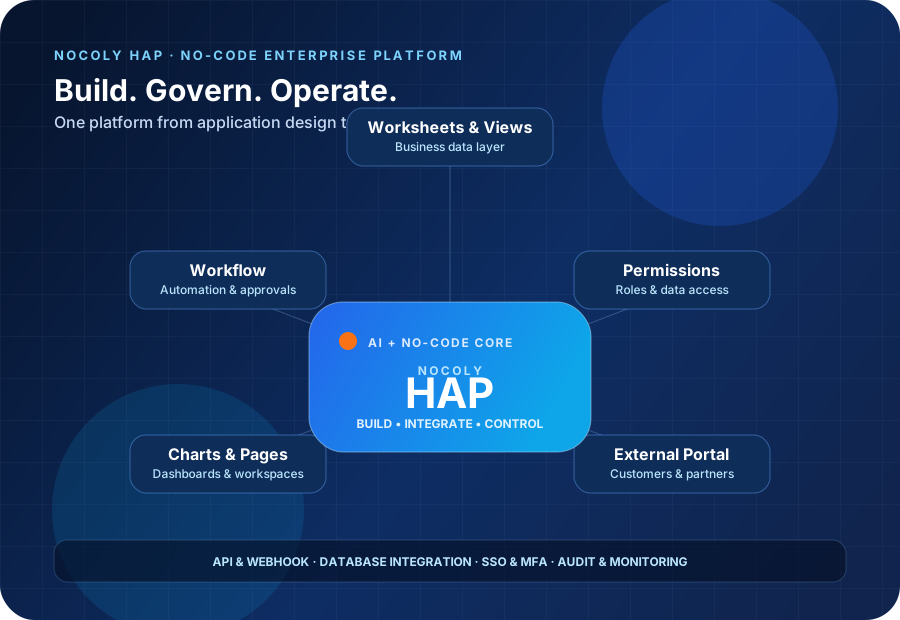
Nocoly HAP (Hyper Application Platform) is a no-code enterprise application platform for business and IT teams to build applications for sales, operations, HR, procurement, compliance and cross-department processes. Applications can start as a form and notification, then expand into a controlled enterprise system with related data, permissions, workflows, analytics and external users.
HAP is not a single-purpose form tool. Its composable application core uses worksheets for data, views for presentation, roles and permissions for access, workflows for automation, charts and custom pages for dashboards, and an external portal for customers, suppliers or partners. The platform also provides AI, API, database integration, plug-ins and cloud-native deployment capabilities.
GNS is Nocoly's systems integration (SI) partner in Hong Kong, responsible for business discovery, process mapping, application prototypes, delivery, data and API integration, deployment, testing, user training and post-launch support. Software licensing, support scope and project terms follow the formal partnership, quotation and contract documents.
Official sources: Nocoly website | Getting Started
Core capabilities
Use the components required for the process, starting with a departmental application and expanding into cross-team and external collaboration.
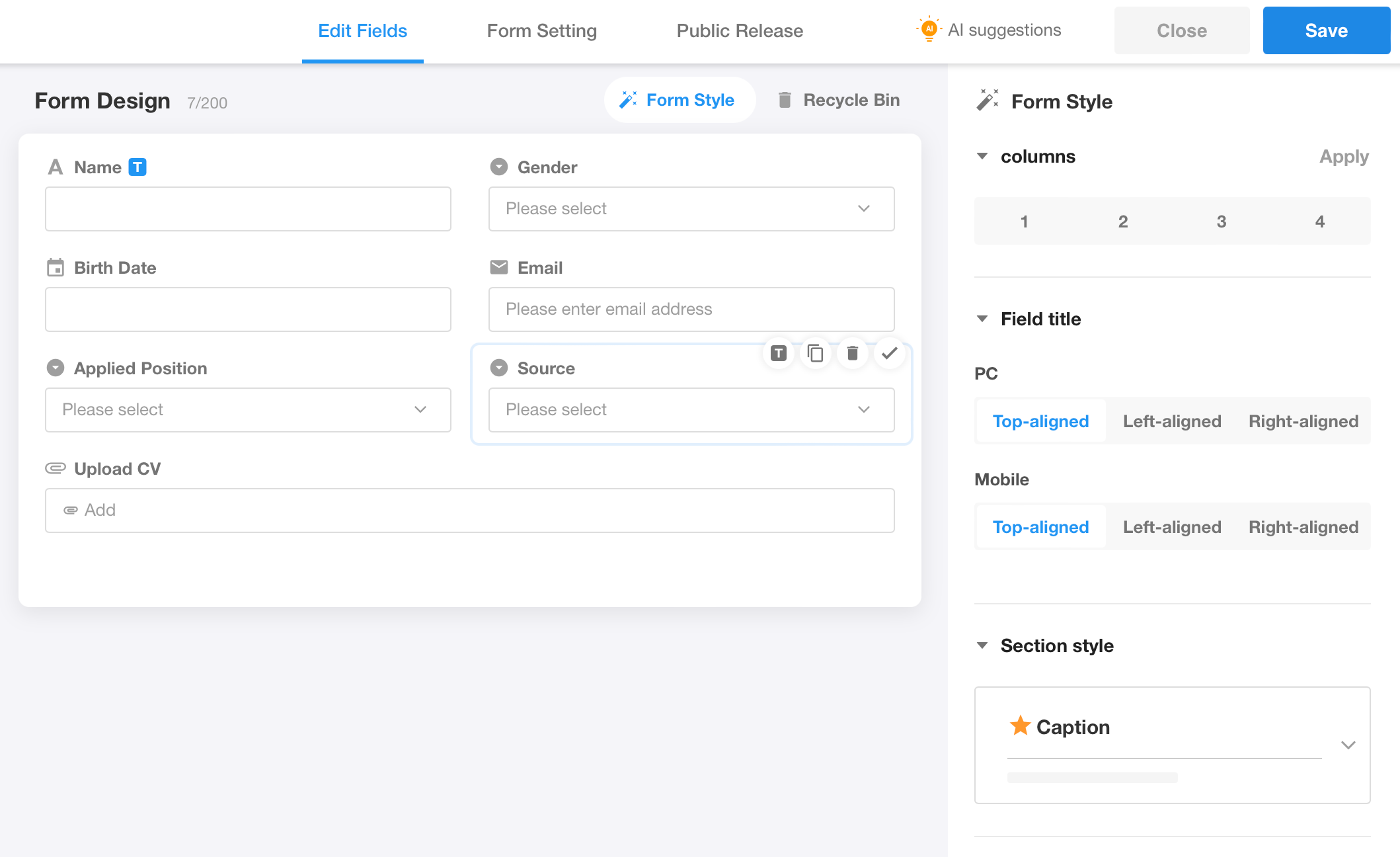
Store and manage customers, orders, employees, assets and other business data with fields, relationships, imports and public forms.
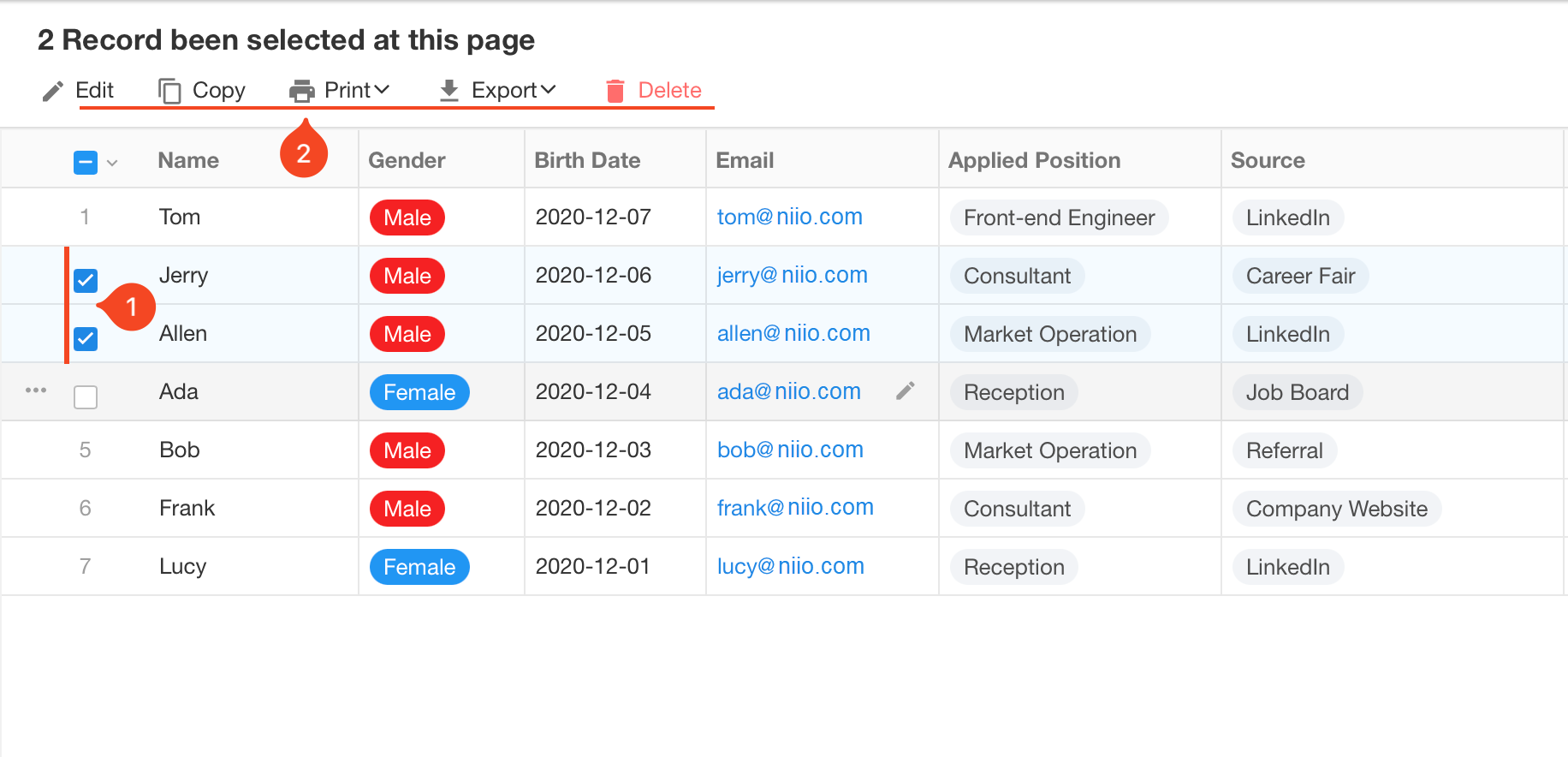
Present the same data through tables, kanban, calendars, galleries, Gantt charts and custom views with filters, sorting and role-based access.
Use triggers, conditions, branches and automation nodes for approvals, notifications, data updates and cross-system actions.
Turn real-time business data into KPI cards, trends, comparisons and operational analysis for management decisions.
Control record and field access through organisation and application roles, and restrict permitted data operations.
Combine buttons, charts, filters, text, images and embedded content into workspaces, portals and management dashboards.
Let customers, suppliers and partners submit data, view records and participate in controlled processes.
Connect data, workflows and external systems through conversation, allowing users to query and act in natural language.
Applications share organisation, permission, integration and deployment capabilities, allowing modules and users to grow with the business.
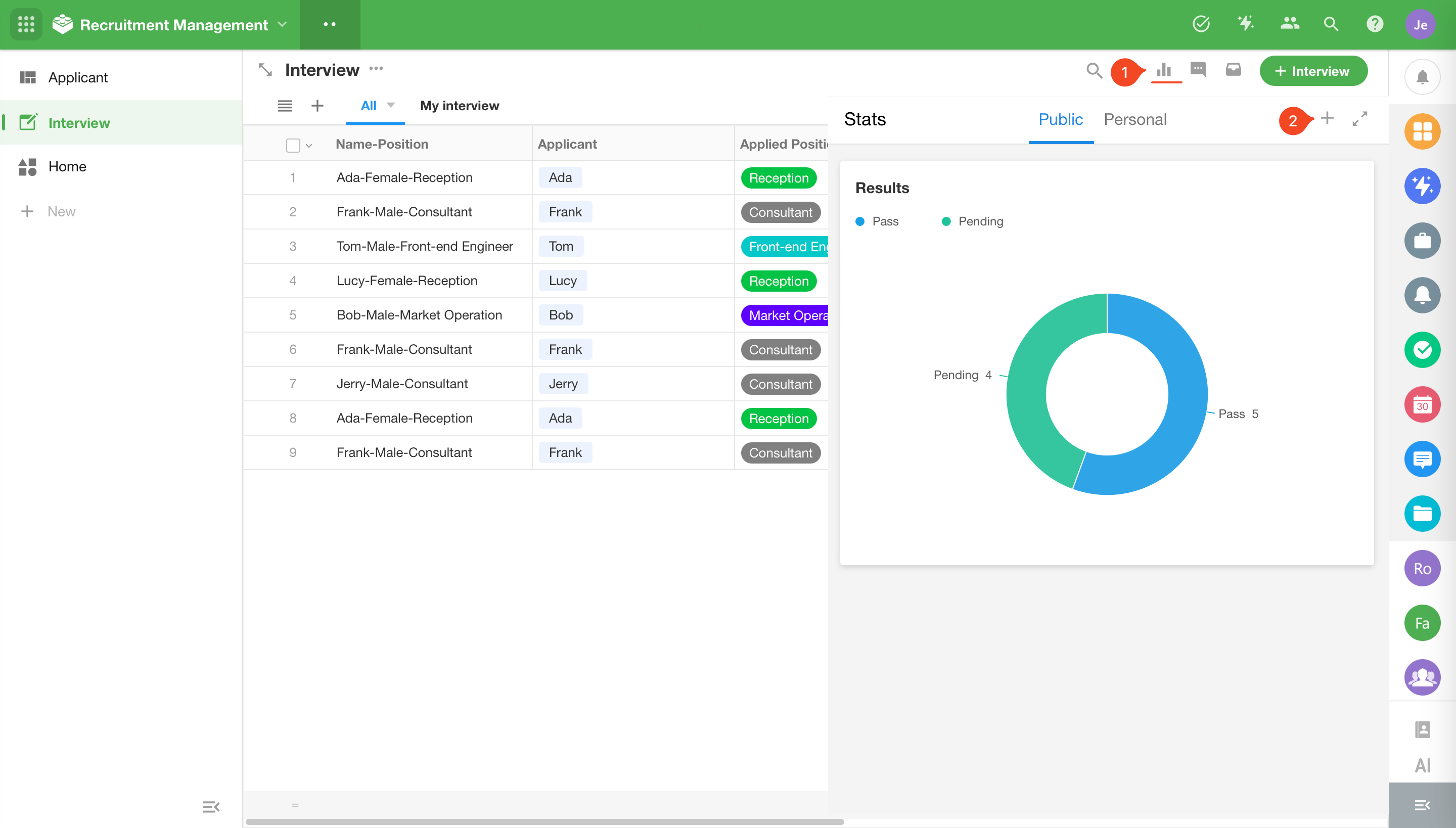
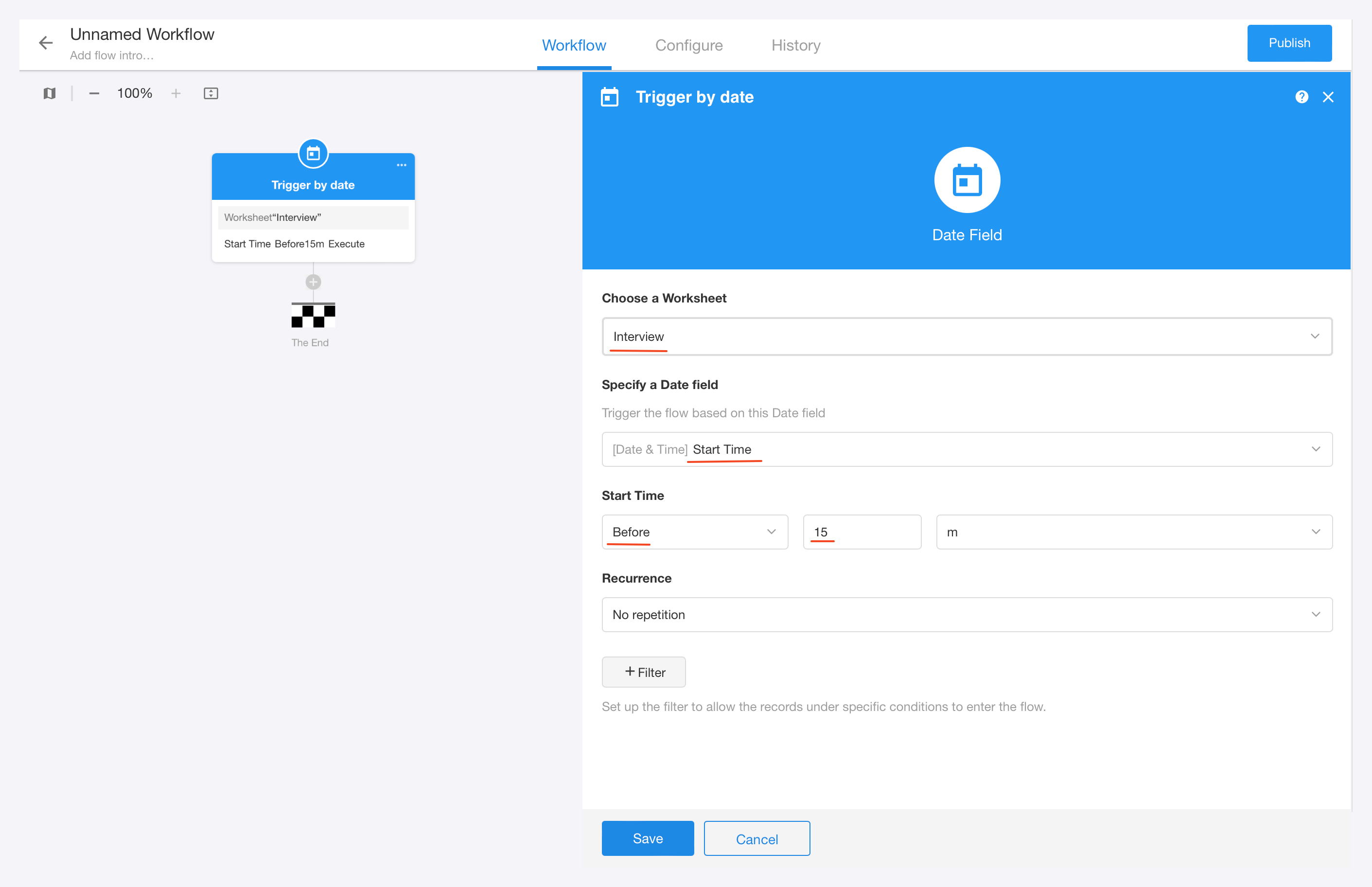
Interface examples
Enterprise AI
Nocoly HAP brings AI-assisted building, process execution and access control into one platform so applications move beyond generated interfaces into governed operations.
Turn ideas, requirements and process instructions into a runnable application structure, shortening the path from requirement to first prototype.
Help teams find information, understand processes and complete work inside the application so AI can participate in daily operations.
When custom agents are used in workflows, identity, data, process and operation-log controls remain part of the delivery.
Public material lists MCP/CLI/Skills integration for Codex and Claude Code; confirm the supported scope against the product version and deployment.
Business applications rarely operate alone. Nocoly HAP's Integration Center and data integration capabilities connect applications to existing ERP, CRM, OA, finance, HR, IoT and industry systems while retaining HAP's control over permissions, workflows and user experience.
| Capability | Purpose |
|---|---|
| Bi-directional data integration | Synchronise data between external databases and HAP, reducing duplicate entry and manual reconciliation |
| 30+ database types | Connect common enterprise databases including MySQL, PostgreSQL, SQL Server and Oracle |
| Visual data processing | Join, map, filter, aggregate and deduplicate data to create usable data flows |
| API Request Builder | Build GET, POST, PUT, PATCH, DELETE and HEAD requests in fields or workflows |
| Auto Webhook | Generate receiving endpoints for real-time events and data from external systems |
| API permissions | Control API read and write scope by application, field and action |
| Third-party platforms | Official material lists DingTalk, WeCom, Feishu, SSO, contact and message-synchronisation capabilities |
GNS first defines source systems, master-data ownership, synchronisation direction, exception handling and retry rules, then designs the API, webhook and database integration. The objective is to deliver an operationally complete interface rather than only a visible “connected” status.
Cloud-native deployment
The same HAP core can run in the cloud or on-premise, start on a single server and expand into an isolated intranet or highly available cluster.
Container-based deployment and upgrades aligned with the customer's cloud platform, operations tooling and backup arrangements.
Run within an isolated internal network for organisations with strict data-control, sensitive-industry or external-connectivity requirements.
Start on a single server and scale to high availability based on user volume, data volume and uptime requirements.
Deploy in a self-managed or selected cloud environment according to enterprise policy, with the target architecture agreed by GNS and the customer.
Separate test and production environments and define deployment, upgrade, configuration-backup and recovery procedures.
GNS handles installation, networking, identity integration, deployment documentation, testing and post-launch support.
Security & governance
Establish the governance foundation through identity, roles, data protection and operation records.
Use SSO, MFA, access policies and device controls to manage access in line with the enterprise identity model.
Separate administrators, departmental users, external users and APIs through organisation roles, app roles and fine-grained permissions.
Official material lists SSL, AES encryption, masking, encrypted storage, watermarking and backups.
Track login, permission, application and data-operation records for investigation, operational monitoring and compliance preparation.
Hong Kong use cases
These are common starting points; actual applications are designed around process, users, data and integration requirements.
Procurement, expenses, leave, resource requests, contracts and management approvals with conditional branches, notifications and linked records.
Customers, opportunities, quotations, follow-up, service records and sales dashboards connected to existing CRM or finance systems.
Recruitment, onboarding, asset assignment, account requests, training, offboarding returns and document filing.
Supplier registration, quotation comparison, purchase orders, goods receipt, payment status and supplier portals.
Project plans, milestones, assignments, risks, issues, changes and management progress views.
Asset registers, QR-enabled operations, maintenance schedules, work orders, parts and service history.
Classification, assignment, SLA, escalation, resolution records and knowledge base, connected to email, messaging or external platforms.
Collect customer, supplier and field data through public forms or portals, then route it into controlled approvals and reporting.
Hong Kong, mainland China and international references
Nocoly's official Case Center discloses some customer names; others remain anonymous for confidentiality. These are vendor references, not projects delivered by GNS.
A financial institution with 10,000+ staff using HAP since May 2025 for financial crime compliance case management across alerts, customer matching, assignment, investigation, approvals, deadlines, sensitive-case authorisation and AI report generation.
Using HAP since August 2025 for AI-assisted report review, combining large language models with hospital rules; report review accuracy reached 96% and supervising physicians' review efficiency improved by 70%.
Scenario-led micro-applications address day-to-day airport needs while balancing business innovation, formal operating guidelines, services, analytics and internal development capability.
Private deployment protects experimental data, while standardised records and QR-enabled operations reduce lookup, manual work and missed checks and improve laboratory visibility.
Product video
Official product introduction video provided by Nocoly.
GNS SI delivery method
Deliver a usable and governed business scope first, then expand according to actual usage.
Confirm departments, roles, approval conditions, data sources, exceptions, permissions and success measures.
Build a working prototype with worksheets, views and critical workflows so users can validate fields, steps and interactions early.
Create related data, permissions, workflows, notifications, charts, custom pages and external portals.
Connect existing systems, APIs, webhooks, databases or identity platforms and define synchronisation, error and retry handling.
Test functions, permissions, integrations and exceptions by role and real process, then complete data import, deployment and acceptance.
Provide administrator and user training plus operating documentation, then improve and extend new applications as usage grows.
FAQ
Nocoly HAP (Hyper Application Platform) is a no-code enterprise application platform. Worksheets, views, permissions, workflows, charts, custom pages, external portals and Chatbot modules are used to build business applications, supported by AI, API, database integration and cloud-native deployment capabilities.
Business teams can build and adjust applications with visual components, but identity integration, databases, APIs, networking, permissions, deployment, backup and security still require IT and SI involvement. GNS combines low-code delivery speed with enterprise governance.
Yes. Starting with one departmental process, form or report allows the team to validate data, roles and workflows before adding integrations, external portals and more departments.
API, webhook, bi-directional data integration and database connections can be used. The design should account for existing interfaces, master-data ownership, synchronisation direction, update frequency, error handling and permissions.
Official material lists containerised deployment, pure intranet, standalone and clustered architectures using Docker, Kubernetes and Helm. The actual design depends on cloud policy, networking, availability, backup and compliance requirements.
Yes. Nocoly HAP can be deployed in a customer-selected cloud, a GNS-managed cloud environment, or the customer's data centre and isolated intranet. Cloud is often suited to rapid start-up and reduced hardware management; on-premise suits data-residency needs, existing server investment or strict intranet control.
GNS compares the total cost of software licensing, cloud resources, servers, storage, backup, networking, implementation, training and ongoing support, then recommends cloud, on-premise or a phased option for the budget. The project can start with a smaller scope and expand with usage.
The customer may provide its existing data centre and servers, or GNS can recommend specifications, architecture, backup, monitoring and support based on expected users, data volume and availability. Hardware, licensing and operational responsibilities are stated in the proposal and contract.
HAP can address departmental processes, forms, reporting and external portals. Replacing a core ERP, finance, HR or industry system requires an assessment of functional coverage, data models, integration, compliance and migration cost. A lower-risk approach is often to use HAP for workflow or integration gaps first.
Yes. GNS scopes the application, users, deployment, integration, migration, training and support requirements and submits a project proposal. Nocoly software licensing and vendor service arrangements follow the formal contract.
Yes. Nocoly's official Case Center lists a Hong Kong licensed bank with 10,000+ staff using HAP since May 2025 for financial crime compliance case management. Sichuan Provincial Third People's Hospital has used HAP since August 2025 for AI-assisted report review, reaching 96% review accuracy and a 70% improvement in supervising physicians' review efficiency. Daxing Airport and Coca-Cola are also publicly listed references. Some customers remain anonymous for confidentiality.
Tell GNS which departmental process, existing systems, user roles and deployment requirements you want to improve. We will identify the right Nocoly HAP scope, then arrange a demo and solution discussion.