Seeyon HR BPM guide with screenshots: onboarding, account opening, offboarding and recovery
GNS Engineering Team 6 min read

Onboarding and offboarding are not isolated forms. They are the two highest-risk handover points in the employee lifecycle. Poor onboarding leaves a new starter without access or equipment; poor offboarding may leave accounts active, devices unreturned and department files trapped under a disabled user.
This is the HR article in the GNS Seeyon practical guide series. Read the Seeyon BPM guide for the general configuration model and the Seeyon DMS guide for record governance.
The screenshots are from the Seeyon E-office V11 demo and are used for read-only functionality and UX assessment. Account tabs, notifications and unnecessary personal details were cropped. No production workflow was submitted, changed or published.
Map the employee lifecycle first
| Stage | HR | Manager | IT / administration | DMS owner |
|---|---|---|---|---|
| Join | Personnel, contract and policy | Role, probation and reporting line | Account, device and access card | Employee folder and onboarding evidence |
| Change | Transfer, confirmation and training | Work plan and performance | Permission and device changes | Document update and version |
| Leave | Notice, payroll and exit file | Customer, project and knowledge handover | Account disablement and asset recovery | File transfer, sharing revocation and archive |
A simple “manager → HR” route cannot prove that VPN, access cards, API tokens or DMS ownership have been handled.
Part 1: onboarding setup
Step 1: divide the form by responsibility
The observed Employee Onboarding Approval form contains Personnel Information, Employment Information and Approval Attitude. The demo fields include name, contact details, identity number, education, title, start date, employing company, department, position, grade, supervisor, probation and approval roles.
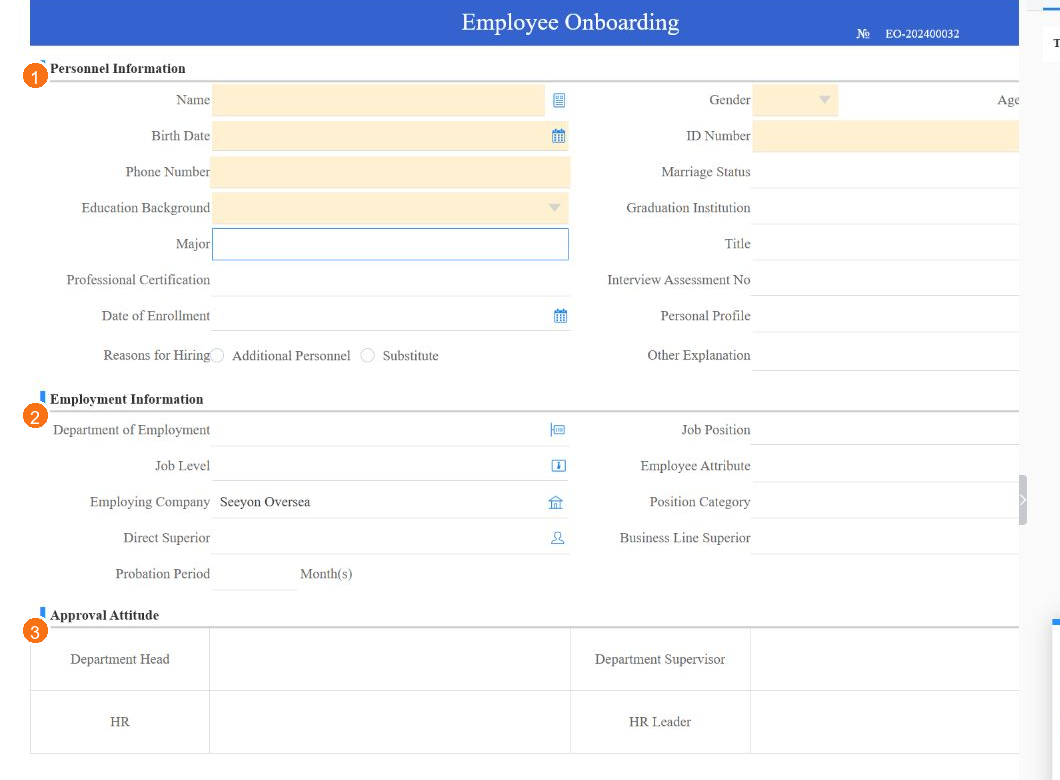
Figure 1: The form groups data by responsibility. A Hong Kong implementation should restrict identity, contact and contract data to the roles that need it.
Decide which fields are entered by HR, confirmed by the manager, populated by the system, conditional on employment type and visible only to HR. Also define which outputs enter the employee DMS folder.
Step 2: connect HR, manager, IT and administration
The workflow shows Initiator, Sender Department, Sender Leader, IT Engineer (Group), Account Opening and Entry Notification. Account opening is therefore part of the case record rather than a separate message outside the system.
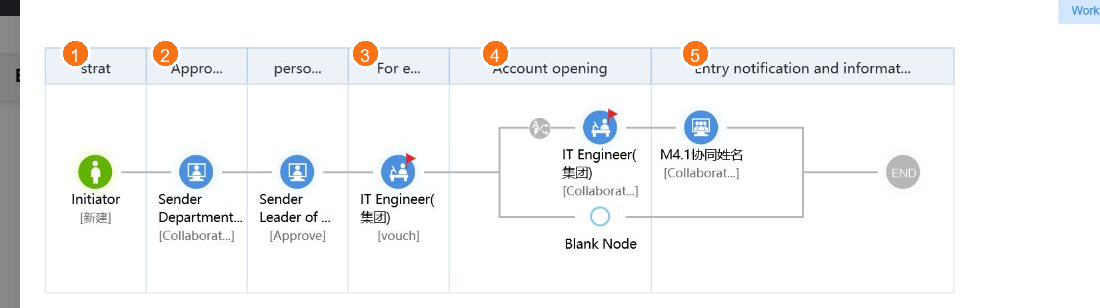
Figure 2: The demo connects the department, IT group and account-opening task. A production design can extend this to devices, access cards, VPN, Microsoft 365 and application access.
| Branch | Task | Evidence |
|---|---|---|
| HR | Contract, payroll input and policy acknowledgement | Document version and date |
| Manager | Role, probation, reporting line and work plan | Manager confirmation |
| IT | AD, Microsoft 365, email, VPN, OA, Wi-Fi and SSO | Account list and enablement date |
| Administration | Laptop, phone, access card and desk | Asset number and handover |
| DMS | Employee folder and departmental access | Folder and permission record |
Step 3: turn the start date into a timeline
- Ten working days before: HR submits and the manager confirms.
- Five days before: IT prepares accounts and devices.
- Two days before: administration prepares access and workstation.
- Start date: accounts activate and the employee, manager and HR are notified.
- First week: confirm device, access and document completion.
Part 2: daily onboarding use
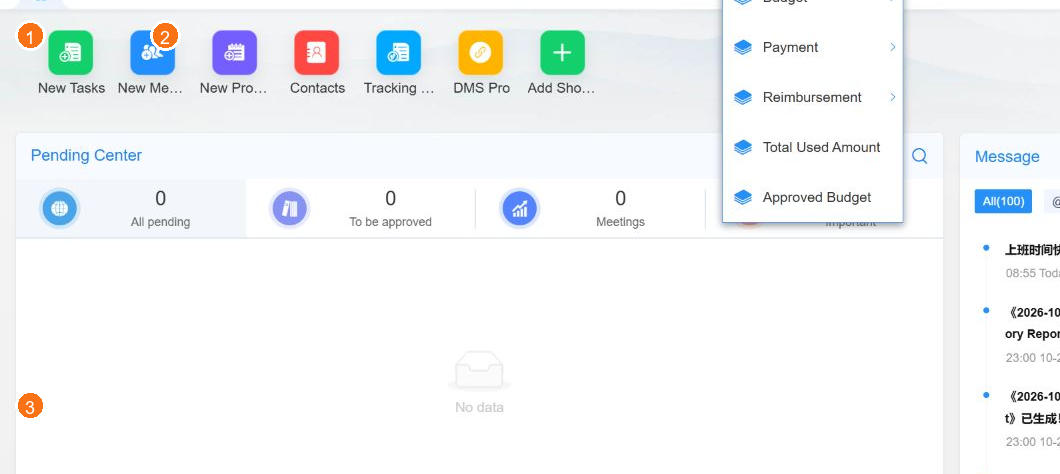
Figure 3: HR, the manager and IT should each see only the tasks that need their action.
HR
Open the onboarding workflow, complete the personnel and employment sections, verify auto-populated department and manager data, attach the approved contract and policy documents, then follow the approval and IT route.
Manager
Confirm the role, grade, reporting line, start date and probation. Specify required applications and equipment with a business purpose and duration rather than requesting every system.
IT
Create AD, Microsoft 365, email, VPN, OA, Wi-Fi and application access only after the approved case reaches the IT task. Attach account and device completion evidence to the same case.
Completion criteria
- The new employee knows the first-day location, contact and documents.
- Email, OA and required systems are available.
- Laptop, phone, access card and specialist equipment are issued.
- HR, IT and administration tasks show completion.
- Onboarding documents are filed in the correct employee folder.
Test manager returns, HR delegates, changed start dates, incomplete IT tasks, field permissions and DMS filing before publication.
Part 3: offboarding, handover and recovery
The observed Resignation Application captures employee details, last date, reason, handover person and handover documents.
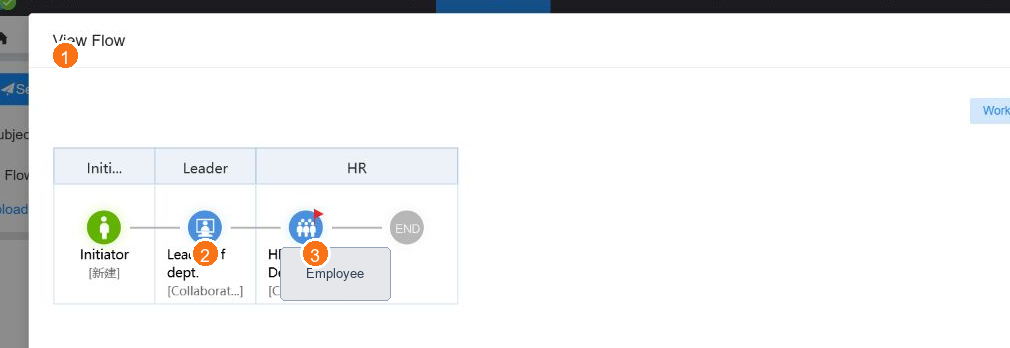
Figure 4: The demo primarily shows department leader and HR. A production implementation must add parallel IT, administration, application-owner and DMS recovery tasks.
Approval alone does not prove that email, VPN, OA, Wi-Fi and SSO are disabled; that devices and access cards are returned; that licences and API tokens are removed; or that department files have a new owner.
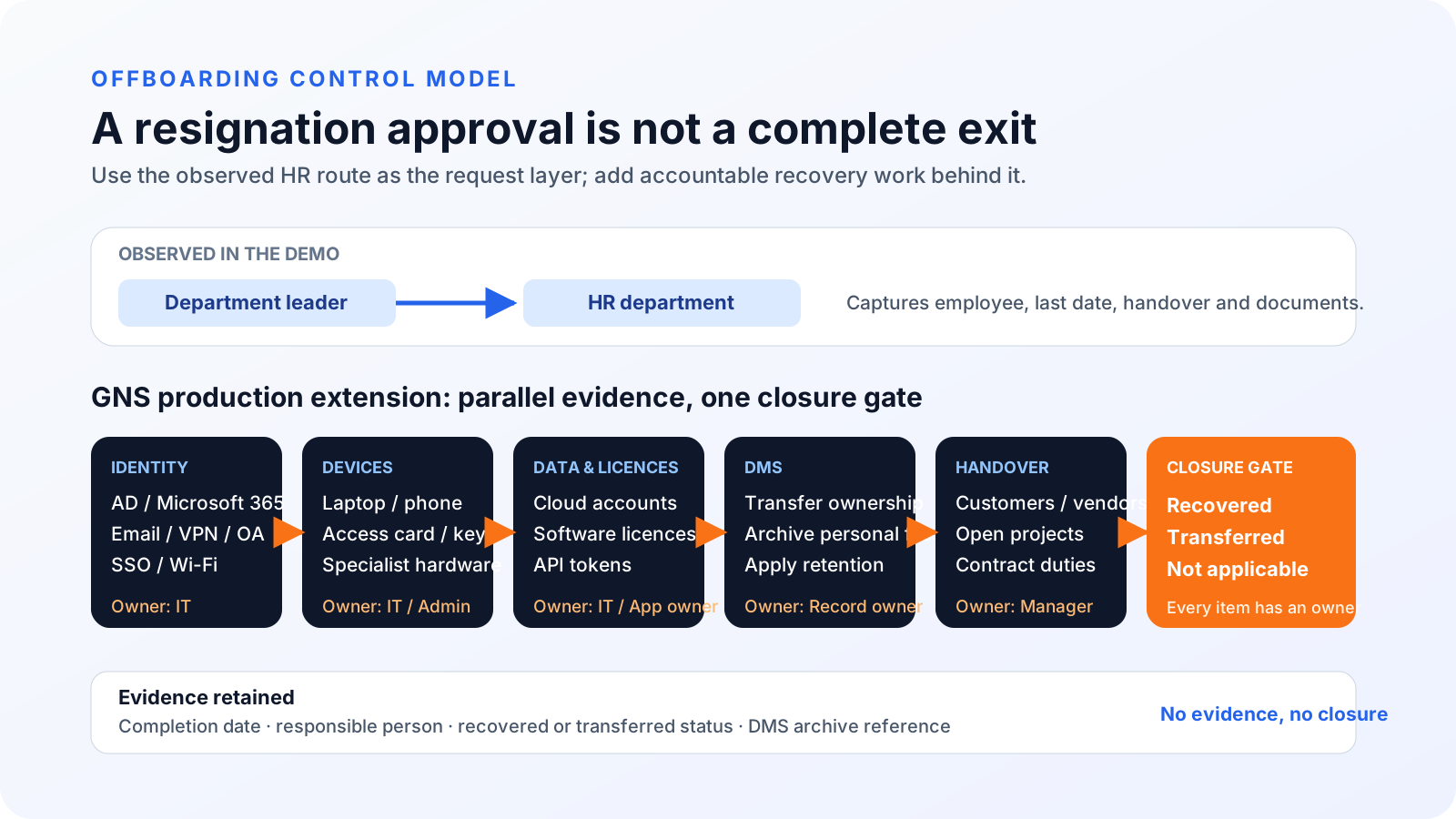
Figure 5: Identity, devices, data, DMS and business handover should run in parallel and meet at one closure gate.
Recommended exit sequence
- Submit the last working day, reason and handover person.
- The manager confirms customer, supplier, project and knowledge transfer.
- HR checks notice, leave, payroll and exit documents.
- IT schedules account disablement, mailbox transfer and remote-access removal.
- IT and administration recover devices, cards, keys and specialist hardware.
- Application owners remove or transfer licences, tokens and vendor access.
- The DMS owner transfers files, revokes sharing and applies retention.
- HR closes only after every owner reports recovered, transferred or not applicable.
- Archive the disablement time, asset numbers, transfer records and completion evidence.
Test a missing laptop, an active VPN, a file still owned by the departing user, a changed last working day and incomplete handover before releasing the workflow.
Continue with the series
- Seeyon BPM: templates, forms, roles, workflows and expense claims
- Seeyon DMS: libraries, sharing, versions and BPM filing
GNS can define the HR workflow, roles, onboarding and exit checklists, account and asset recovery, DMS transfer, integration tests, training and local support. Contact GNS to arrange a Hong Kong-focused demonstration.
Based on the Seeyon E-office V11 demo observed on 29 October 2026. The visible resignation route is not evidence that every IT recovery control is already configured. Actual workflows and compliance requirements depend on company policy and implementation.
FAQ
Can Seeyon onboarding include IT account creation?
Yes. The observed Employee Onboarding Approval flow includes Sender Department, Sender Leader, IT Engineer (Group), Account Opening and Entry Notification. A production workflow can add AD/Microsoft 365, VPN, OA, Wi-Fi, devices and licence checks.
Should HR or the hiring manager start onboarding?
Either model can work. A common design has HR create the case and collect personnel data, the manager confirm the role and probation, and HR complete the contract and policy checks. Each role should have its own permissions.
Does the resignation workflow automatically disable every account and recover devices?
The observed resignation form collects the last date, reason, handover person and documents, but the visible route primarily involves the department leader and HR. Add parallel IT, administration, application owner and DMS tasks, with every item marked recovered, transferred or not applicable.
How can the company stop a former employee from accessing data?
Cover AD/Microsoft 365, VPN, OA, Wi-Fi, SSO, cloud licences, API tokens, shared folders and vendor accounts. Trigger IT from the approved last working day and retain disablement time, owner and evidence.
Should an exiting employee's files be deleted?
Files still needed by the department should be transferred to the manager or another document owner, then the remaining personal copies handled under policy. Direct deletion can remove customer, project or contract records.
How should an HR workflow be tested?
Test new hires, changed start dates, manager returns, IT tasks, missing devices, withdrawal, delegate routing and DMS ownership transfer. Use fictional employee data and involve HR, IT, administration and managers.